
How to prepare for an open-book exam: notes, practice and printing

Algor Lab
September 30, 2026

You have the lecture slides, a textbook and six folders of notes. The exam allows reference material, so finding a fact ought to be easy. Yet during a practice question, you spend three minutes looking for the right formula and still cannot explain what your answer means.
Open-book exam preparation means learning the material and organising the resources you are allowed to consult. You need to recognise which idea a question calls for, find a detail when necessary and use it in an answer. This guide takes you through a practical notes index, an original worked example and a timed rehearsal, with a way to prepare printable material in Algor.
What does an open-book exam actually allow?
Start with your assessment brief or module handbook. “Open-book” describes access to some resources; it does not give every student the same permissions. A printed reference sheet, an annotated textbook and unrestricted access to your own files are different arrangements.
Cornell’s guidance on open-book exams makes this the first preparation task: establish what you may access and how the assessment works. Check these points with your own lecturer or instructor:
- Which books, notes and other materials are permitted, and are there page or format limits?
- Can you use digital files, search the internet or access software? Is AI permitted at any stage?
- How long is the working time, and what are the submission instructions?
- What kinds of answers are required, and how should you acknowledge sources?
An online exam is not necessarily open-book. Likewise, permission to consult notes does not automatically include permission to use an AI assistant. The Algor workflow below is for preparation; what you can take into the assessment depends on its rules.
Prepare for the decision the question asks you to make
Recognising a definition on a page and applying it to an unfamiliar situation are different tasks. A question might give you a business proposal and ask whether its assumptions are reasonable. Finding a formula helps with the calculation, but does not settle the judgement.
UCL’s open-book assessment guidance highlights understanding, analysis and application across a module. Use your own assessment criteria and sample questions to decide what that means for your course.
For each major topic, write one question that goes beyond naming it: When would I use this? What would change my conclusion? Which evidence supports the explanation? If you can only copy a paragraph into the answer, return to the underlying idea before expanding your notes.
If several exams are approaching, fit this work into your plan for studying for multiple exams. Give each session a visible result, such as answering one scenario and improving the reference page it exposed as weak.
Make an open-book exam notes index you can actually use
Your index should answer a simple question: “Where is the thing I need?” It does not need to repeat the whole course. Keep the detail in its original location and make a short route back to it.
Build the index around the module’s topics and the tasks you must perform. A heading such as “Week 4” means little when you are trying to check an assumption. “Break-even analysis: formula, assumptions and worked example” tells you what is there.
The table below is a copyable model. Its locations are illustrative, not references to a real course. Replace them with the exact filenames, sections or printed page numbers in your own material.
| Topic or task | Where to look | What to check |
|---|---|---|
| Calculate a break-even point | Cost analysis notes, section 2 | Formula and meaning of each input |
| Evaluate a pricing proposal | Cost analysis notes, section 3 | Demand assumptions and limits of the model |
| Support an argument | Reading notes, entry for the relevant study | Finding, limitation and original source location |
| Check the assessment requirements | Current assessment brief | Permitted resources, timing and referencing |
Test a row immediately: choose a question, pick the relevant topic label and follow its location to the source. Does it lead to the detail you need? Rename vague headings. Remove duplicate versions that could send you to an outdated explanation.
If your material is still scattered, you can start an Algor Set from your course notes. A Set organises study material into sections and editable pages. Review the proposed index before generating it, then check the resulting explanations against the original sources. Keep your own source locations alongside the relevant notes.
In the Set creation flow, the advanced content instructions let you describe the result you need. For this task, you could ask: “Organise my notes by topic. Keep the assumptions and important qualifications. Include a short explanation and a worked example where my material provides one.” Review what Algor produces before treating it as reference material: an orderly index cannot tell you whether a source was incomplete.
Choose what belongs on a reference page
A useful page contains the details you need to check and the distinctions you are likely to confuse. For a quantitative topic, that might mean a formula, defined symbols, units, assumptions and one worked example. For an essay topic, it might mean competing explanations, evidence for each and a limitation that changes the argument.
If your answer draws on journal articles, keep reading notes that connect each claim to its evidence. Record the finding and its limits before deciding where it belongs in your argument.
Keep quotations visibly separate from your paraphrases, with their source locations. That makes it easier to use evidence accurately when you are writing under time pressure. A polished sentence without a traceable source creates extra work later.
When reducing your notes, preserve the conditions that make a statement true. “This model assumes…” can be more useful than another definition. Our guide to reviewing lecture notes with AI explains how to retain the reasoning behind a slide while making the material easier to work with.
You can edit Algor’s page text to add these qualifications, examples and references. The guide to editing Set pages shows the available controls. Aim for a page that helps you reconstruct an explanation, with enough space to find its parts.
A worked example: finding a formula is only the start
Consider this original practice scenario for a business or introductory accounting module. It is not an official exam question.
A student society plans an event. Under its current proposal, fixed costs are £4,800, each ticket sells for £20 and the variable cost per attendee is £8. A revised proposal would charge £18, with variable costs of £9 per attendee and fixed costs of £5,400. Compare the break-even points and explain what else you would need to recommend a proposal.
Your reference page gives the standard break-even formula:
Break-even attendance = fixed costs ÷ (ticket price − variable cost per attendee).
| Calculation | Current proposal | Revised proposal |
|---|---|---|
| Contribution per attendee | £20 − £8 = £12 | £18 − £9 = £9 |
| Break-even attendance | £4,800 ÷ £12 = 400 | £5,400 ÷ £9 = 600 |
The revised proposal needs 200 more attendees to break even. That answers the calculation, but the question also asks for a recommendation. You would need to consider likely ticket sales at each price, venue capacity and whether the assumed costs stay valid as attendance changes.
A good reference page therefore needs more than the equation. Add a short reminder: “Check demand and capacity; do not assume the two prices attract the same attendance.” The note helps you notice an assumption without supplying a memorised conclusion for every possible scenario.
Now alter one input and solve the problem again without looking at the worked answer. Explain which part changed and why. This reveals whether you can use the formula independently or have only become familiar with this particular calculation.
Print the material you need
Paper can be useful for revision away from your screen and for assessments that permit printed notes. Select the material after a practice attempt: it shows which pages you consulted, which were missing something and which only added bulk.
Algor lets you print a page or selected tools, such as its summary or concept map, and export a Set. The printing and export guide explains these options. Textual content can become printed revision material as well as remaining editable on screen.
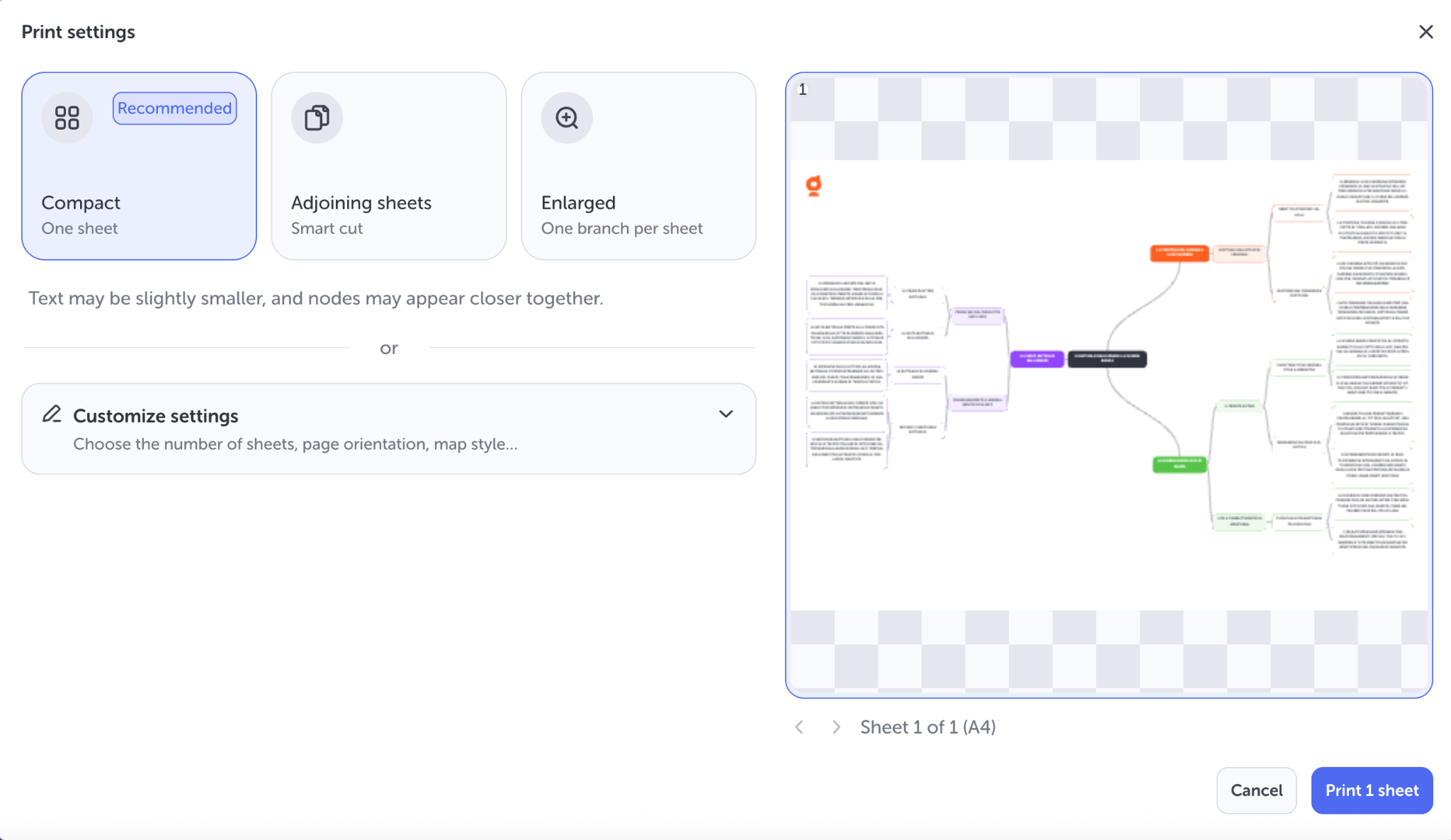
If a map clarifies relationships in your topic, check its layout in the preview before printing. If you need a precise explanation or a worked calculation, a text page may be more useful. You do not have to turn every topic into the same format.
The map menu offers a compact single sheet, adjoining sheets with smart cuts, or an enlarged layout with one branch per sheet. You can also customise settings such as sheet count and orientation. Choose according to readability: fitting a large map onto one page is only helpful if you can comfortably read it.
Print one sample page at the size you intend to use. Read the smallest text, check that nothing is cut off and confirm that your index points to the correct pages. If you change the document afterwards, update those references. For an exam with a page limit, check the final output against the assessment instructions.
Rehearse with the resources you will have
Once the material is usable, try an authorised practice question under the relevant conditions. Use the resources permitted for your assessment and a realistic time allowance. The University of Sheffield’s guidance recommends practising with questions and noticing which topics send you repeatedly back to your notes.
Afterwards, distinguish three problems. If you could not find a detail, repair the index. If you found it but did not understand it, revisit the explanation. If you understood it but could not apply it, work through a different question. Each problem needs a different next session.
For an essay assessment, rehearse a short argument as well as looking up evidence. State your answer to the question, choose a supporting example and explain a limitation or alternative interpretation. Check whether each paragraph advances that answer. A page of accurate quotations can still leave the argument unfinished.
Algor can support that preparation with an assessment on a whole Set, a section or a page. Its assessment settings include open answers, a timer and a choice of immediate or end-of-assessment feedback. Use generated questions for extra practice; check uncertain answers against your course sources. AI feedback is not your lecturer’s marking scheme.
Record recurring difficulties in a short exam error log, then return to an authorised course question to see whether your answer improves. That is a more useful check than repeatedly reorganising the same notes.
Make the final preparation session small and specific
Before the exam, confirm that you have the right versions of your permitted materials and the current submission instructions. For a digital assessment, practise the required file or upload process if your institution provides a way to do so.
Then answer one question using your finished resources. You should be able to explain your approach, locate a detail and return to the answer without losing your place. Any remaining difficulty gives you a clear task for the next session.
To begin, open Algor with one topic from your course. Build its index, correct its reference page and try a question before expanding to the rest of the module. A small collection you know how to use is a practical starting point for the next open-book exam.


Faq
Frequently Asked Questions



Get Started with Algor
Transform your content into structured, visual and personalized learning paths.

.svg)


