
Concept Maps vs Mind Maps: Five Key Differences

Nina Komadina
September 24, 2026
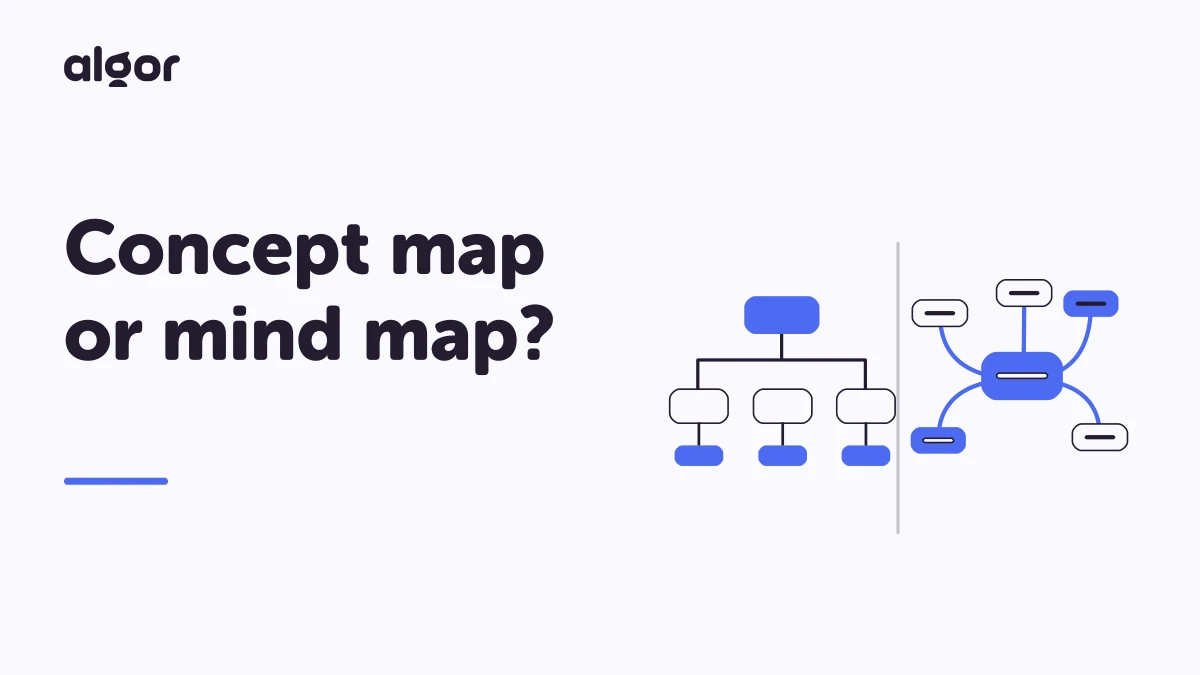
Concept maps and mind maps: which one will help you study?
You want to turn a dense chapter into something you can actually see and remember. Should you build a concept map or a mind map? The terms are often used interchangeably, and both can help you organise information. But their different structures make them useful for different tasks.
A concept map helps you explain how ideas relate to one another. A mind map helps you explore the associations that grow out of a central topic. Knowing the difference makes it easier to choose a format that supports what you need to do next: understand a chapter, plan a presentation or practise an explanation.

Here are the five main differences between concept maps and mind maps, from their origins to the way you build and use them:
- Their origins: Novak's model and Buzan's approach.
- Their appearance: nodes, linking words, colours and images.
- Their structure: a hierarchy or branches radiating from the centre.
- Their construction: relationships first or associations as you go.
- Their purpose: different maps for different kinds of work.
1. Origins: Novak's model and Buzan's approach
Concept maps and mind maps developed along different paths. Although both became established around the same period, their best-known proponents had different aims.
Concept maps grew out of Joseph Novak's work at Cornell University in the 1970s, informed by David Ausubel's theory of meaningful learning. The central idea is that learning involves relating new concepts to what you already know. Representing concepts and connecting them with phrases makes those relationships visible.
For example, joining “plants” to “photosynthesis” with “produce sugars through” communicates more than putting the two terms next to each other. It creates a statement you can explain and check. That emphasis on meaningful relationships is the defining feature of a concept map.
Around the same period, British author Tony Buzan popularised mind mapping, notably through the television programme and book Use Your Head in the 1970s. The approach emphasises associations branching from a central subject and makes deliberate use of pictures and colour.
Mind maps are therefore useful beyond studying. You can use one to explore a project, plan an event or sort out a collection of ideas before deciding which ones deserve more attention.
2. Appearance: nodes, arrows, colours and images
The most obvious difference is visual. A concept map generally contains:
- Concept nodes: boxes or other shapes containing keywords or short phrases.
- Connecting lines or arrows: links that show the relationships between those concepts.
Those links often carry linking words, such as a verb or short phrase. Read a node, its link and the next node together, and they should form a meaningful statement. This makes the map useful to someone other than the person who created it.
Colour and illustrations are not required to express those relationships, but modern digital concept maps can include both, as well as audio and video. The important question is whether each element clarifies the content.
A mind map also uses short keywords, but the presentation is usually freer. Ideas do not have to sit inside boxes, and branches often use different colours. Pictures can act as personal memory cues, not merely as illustrations of a definition.
That freedom is useful when an image or association helps you remember something. However, a symbol that makes perfect sense to you may need an explanation when you share the map with a classmate.
3. Structure: hierarchy versus a radial layout
A concept map often uses a hierarchical, tree-like structure. A broad concept appears near the top and leads to more specific ideas beneath it. Cross-links can also connect different branches when those relationships matter.
A mind map usually has a radial structure: a topic sits in the centre, with branches spreading outwards. Each branch explores an aspect of the topic or an association prompted by it, without needing the same formal hierarchy.

The starting concept therefore plays a different role. In a concept map, it anchors the explanation that follows. In a mind map, it acts as a starting point for several possible directions, which may be relatively independent of one another.
Neither layout is automatically better. If you need to explain causes, categories or a process, a hierarchy with explicit links may be clearer. If you need to explore possible themes for a presentation, a radial arrangement may give you more room to think.

4. Construction: how to build each kind of map
The difference is not just the finished picture. It also changes what you do when you start with a blank page.
To create a concept map, first identify the key concepts and work out how they relate. Begin with the broader ideas, then add the more specific ones. Choose connecting words carefully: the link between a parent node and a more detailed node should explain something, not merely fill space.
Someone following the branches should be able to reconstruct your reasoning. This is why preparing a concept map already involves studying: you have to select, reorganise and express what the material means.
A mind map can develop more spontaneously. Put the topic in the centre and add the associations it brings to mind. New ideas and links can emerge while you draw, without a strict separation between gathering content and arranging it.
Once the ideas are on the page, review them. Remove repetitions, combine related branches and make the important points stand out. The first version can be exploratory; the version you use for revision should still be readable.
In practice, the distinction is about priorities. For a concept map, prioritise the relationships between key ideas and move from general concepts to detail. For a mind map, give yourself room to explore useful associations before narrowing them down.
5. Purpose: different maps for different tasks
Concept maps are particularly useful for understanding and consolidating material. Making one requires you to summarise and reorganise a topic. Later, the explicit connections give you a structure for an oral explanation or a written answer.
Try one when you need to explain how a biological process works, how events in history influenced each other, or how the parts of a legal framework fit together. Then cover the map and see whether you can reconstruct the main links.
Mind maps are useful for creative exploration, brainstorming and planning. They give you a way to collect ideas for an essay, presentation or project before you settle on an argument or sequence.
Their associative structure can also help with work that crosses subject boundaries. A central theme such as energy could lead to branches on physics, economics, politics and environmental issues. You can then decide which connections are worth developing.
These uses are not rigid rules. You might brainstorm with a mind map first, then build a concept map to explain the relationships you want to present. Let the learning task guide the format.
Create concept maps and mind maps with Algor
Digital maps make both approaches easier to revise. You can move a branch, correct a label, add an example and share the result without redrawing the whole page. You can also return to the same material from different devices.
Algor Education brings AI-generated maps into a broader study environment. Upload a PDF, Word document, photo, pasted text or a web or YouTube link, or start with a topic. Choose Create an Algor Set to build a study guide organised into sections and pages, with maps, summaries and audio alongside the text. You can then launch flashcards and quizzes on the material you choose.
If you only need a map, select the individual Map content type. You can also build a map manually from a blank canvas. The official creation guide explains the available starting points.
In the editor, switch between tree, radial and compact layouts. Change node colours and fonts, and add images, video or audio where they help explain a concept. Move, rename, add or remove individual nodes and connections until the map reflects your understanding.
You can also describe an edit to the AI, such as adding a branch about causes or shortening a section. Maps can be translated into another language, printed or exported. The generated version is a starting point you can check and improve, rather than a finished diagram you have to accept unchanged.
For group work, invite classmates as Editors to collaborate on the same Set and edit maps in real time. You can also share the Set by link or QR code. See the guide to editing and sharing Sets for the steps.
Whether you start with a structured explanation or a page of associations, the aim stays the same: make the relationships clearer, then use the map to explain the material for yourself.
Adapted from an article by Nina Komadina, content creator.
Continue exploring


Faq
Frequently Asked Questions


Get Started with Algor
Transform your content into structured, visual and personalized learning paths.

.svg)


