
MindMeister vs Algor: Which Is Better for Studying?
.png)
Giulia
September 24, 2026
A clear map can make a difficult chapter feel manageable. But when you close it, can you still explain the ideas, remember the details and answer an exam question? If you are comparing MindMeister vs Algor for studying, that is a useful place to start.
Both platforms let you work visually and collaborate with other people. Algor's advantage is what surrounds the map: editable study pages, summaries, audio, spaced flashcards, assessments and progress by topic. You can build the explanation and then practise it in the same environment.
This comparison is for students looking for a MindMeister alternative that supports the whole journey from course material to exam preparation. We will look at how the editors work, what happens after you have created a map and which workflow makes it easier to act on the topics you have not mastered yet.
From a shared map to your own exam preparation
You do not have to give up collaborative mapping to choose Algor. It supports real-time work with classmates, manual map creation and AI-assisted editing. You can customise layouts and add images, audio or video to nodes, then use text-to-speech or print options when listening or studying on paper suits you better.
Imagine a group preparing for an oral exam. Together, you build a map of the main themes, improve the page order and add examples to the explanations. Afterwards, each person can practise flashcards or take a quiz on the section they need to review.
The Set's AI assistant knows the study material, so you can ask about a connection between two chapters without copying the context into a separate conversation. Quiz results help you see what to revisit. That is the difference between keeping an organised shared diagram and using it as part of a complete preparation routine.
MindMeister and Algor at a glance
What is MindMeister, and who uses it?
MindMeister is an online mind-mapping platform from Meister. It helps people visualise ideas, develop plans and collaborate on maps, with connections to the company's task-management product, MeisterTask.
It is used by professionals and teams for brainstorming, planning and presenting ideas, as well as by teachers and students. Its central activity is working with the map: arranging the ideas, discussing them and using the result in a project or presentation.
MindMeister is available through the web and mobile apps. For studying, the key question is whether a mapping-focused workflow is enough, or whether you also want a dedicated system for practising and monitoring the material.
What is Algor Education, and who is it for?
Algor Education is an AI-powered study platform originating from a project at the Polytechnic University of Turin, with an emphasis on making study material more accessible. It is designed for learners who need to understand, organise and retain information.
Upload PDFs, Word documents, photos of notes, pasted text or links, or use transcription for recorded lessons. Algor turns the material into a Set: a study guide organised into sections and pages, with maps, summaries and audio alongside the text. Flashcards and assessments then run on the part of the Set you choose.
The workflow suits secondary-school and university students, people preparing for entrance or professional exams, and anyone studying a substantial body of material. Reading aloud, readability options, adaptable language and AI explanations let you shape the content around your needs.
Algor works on the web and through iOS and Android apps. Your material stays available as you move between devices, although some advanced editing is better supported on desktop.
The main difference
MindMeister centres on visualising and collaborating on ideas. Algor connects visual work to understanding, remembering and assessing study material.
MindMeister also has AI map generation, so the distinction is not that one product can generate a map and the other cannot. It is what you can do around the map when you need to prepare for an exam over several weeks.
MindMeister's features and what they mean for studying
Manual and AI-assisted mind mapping
In MindMeister, you can start with a central idea and add branches manually. The visual editor lets you arrange ideas, change colours and add visual elements to make a map easier to follow.
AI generation can provide a starting point from a prompt or file. Availability and usage conditions may change as features develop, so check the current MindMeister product information for the plan and workflow you intend to use.
For a student, either starting point can be useful. Building a map yourself encourages you to think about the organisation; generation can reduce the time needed for an initial draft. In both cases, reviewing the content and relationships remains part of the learning.
Collaboration, MeisterTask and presentations
Collaboration is an important part of MindMeister's appeal. Multiple people can work on a map, discuss ideas and connect planning work with MeisterTask. Presentation features and templates can also support meetings, group projects and classroom explanations.
Algor supports real-time collaboration too. Its particular benefit for a study group is that the shared work can become the starting point for individual revision. After editing the material together, each student can practise the same topics with flashcards and assessments.
If you are planning a project, task-management connections may be useful. If you are preparing a shared syllabus for an exam, the connection between the map and the practice activities is usually more relevant.
The free plan and paid features
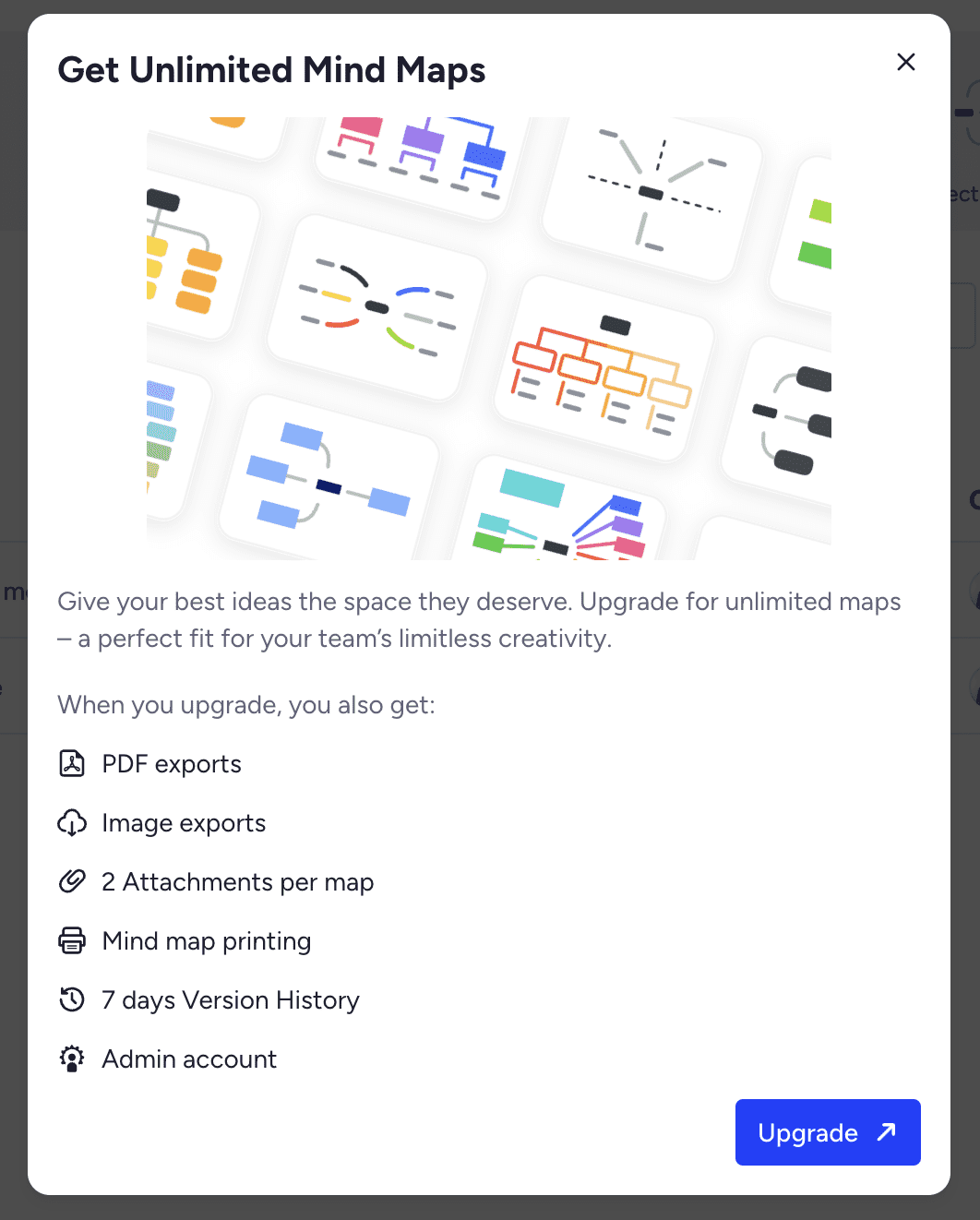
MindMeister's free offering limits the number of maps, while paid plans unlock broader use and additional features such as exports, attachments or other plan-dependent capabilities. Check the current pricing page before choosing a plan on the basis of a specific feature.
For studying, think about the amount of material you will actually create. A course with several chapters may need more than one large diagram. A small free map allowance can be useful for trying the editor but may not cover a full semester's workflow.
The step from mapping to active recall
A useful map shows how a topic fits together. It does not, by itself, tell you whether you can recall that information without looking. The next step is to practise producing answers and use the results to guide your study.
Algor puts that next step in the same environment. Select a topic, review its flashcards, take an assessment and check your progress. That is a practical reason to prefer it when your goal is to remember and use the material, rather than only represent it visually.

Why Algor is a stronger fit for studying
Generate editable maps from your course material
From Home, choose Create an Algor Set and supply your material: for example, a textbook PDF, a photo of handwritten notes, copied text or a link. You can also begin with a topic when you do not yet have a document.
Specify the audience, style and language, then review the proposed outline. This gives you a chance to check that the structure matches the syllabus before generating the pages and their study tools.
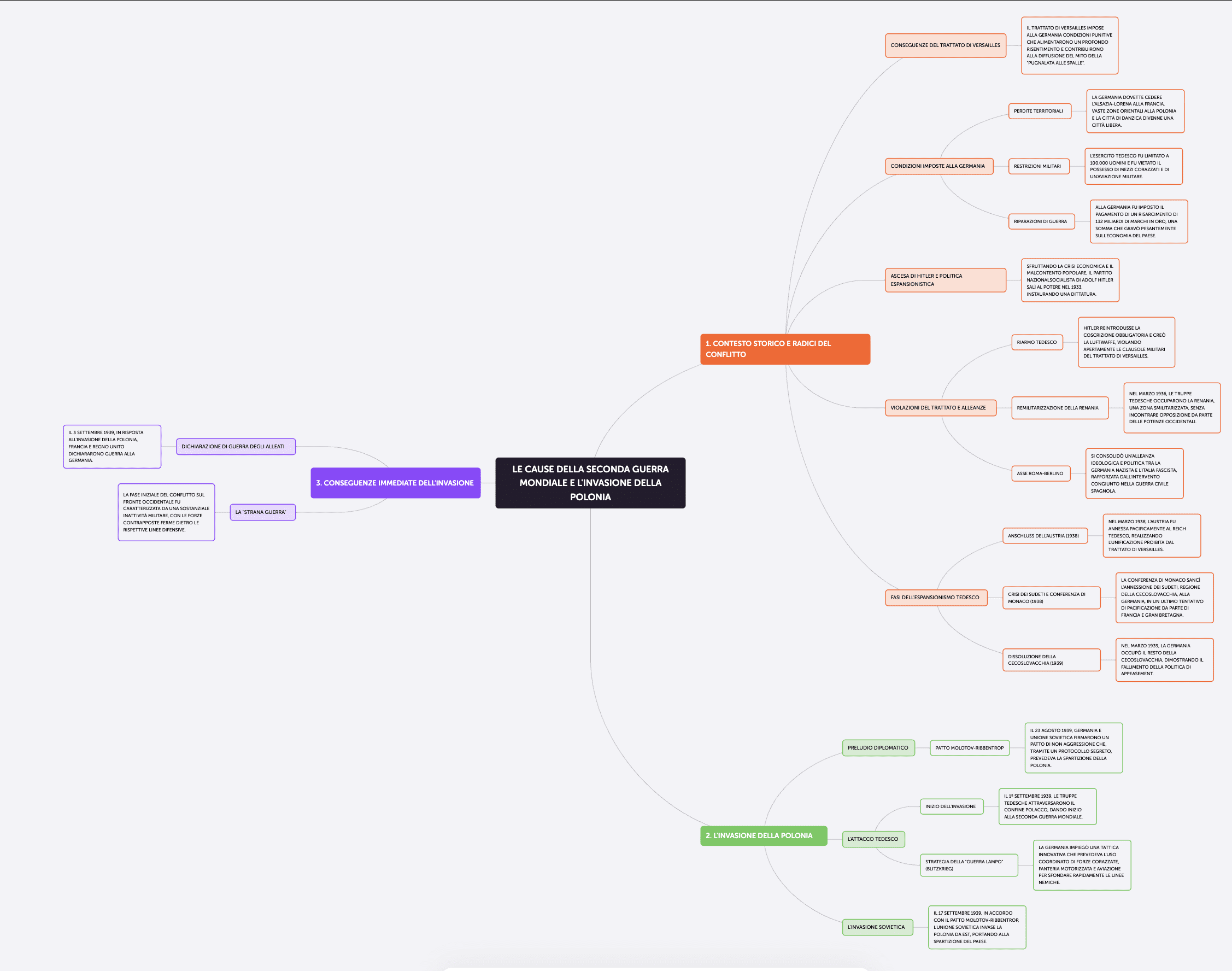
You do not have to build every node from scratch. The generated map gives you a structure to inspect and improve. Move, rename, add or delete nodes and connections, or describe a change to the AI. Add a teacher's example, expand an underdeveloped point or simplify a crowded branch.
The editor is a substantial part of the product, not an image viewer. Switch between tree, radial and compact layouts, customise colours and fonts, and place images, audio or video in the nodes. You can translate the map and use listening and print options when you need a different way to study it.
If you only need one map, create it as an individual content type. If you prefer to organise the ideas yourself, start manually. AI generation is an option for reducing preparation work, not a requirement to accept a fixed result.
A complete Set: map, summary, flashcards and assessment
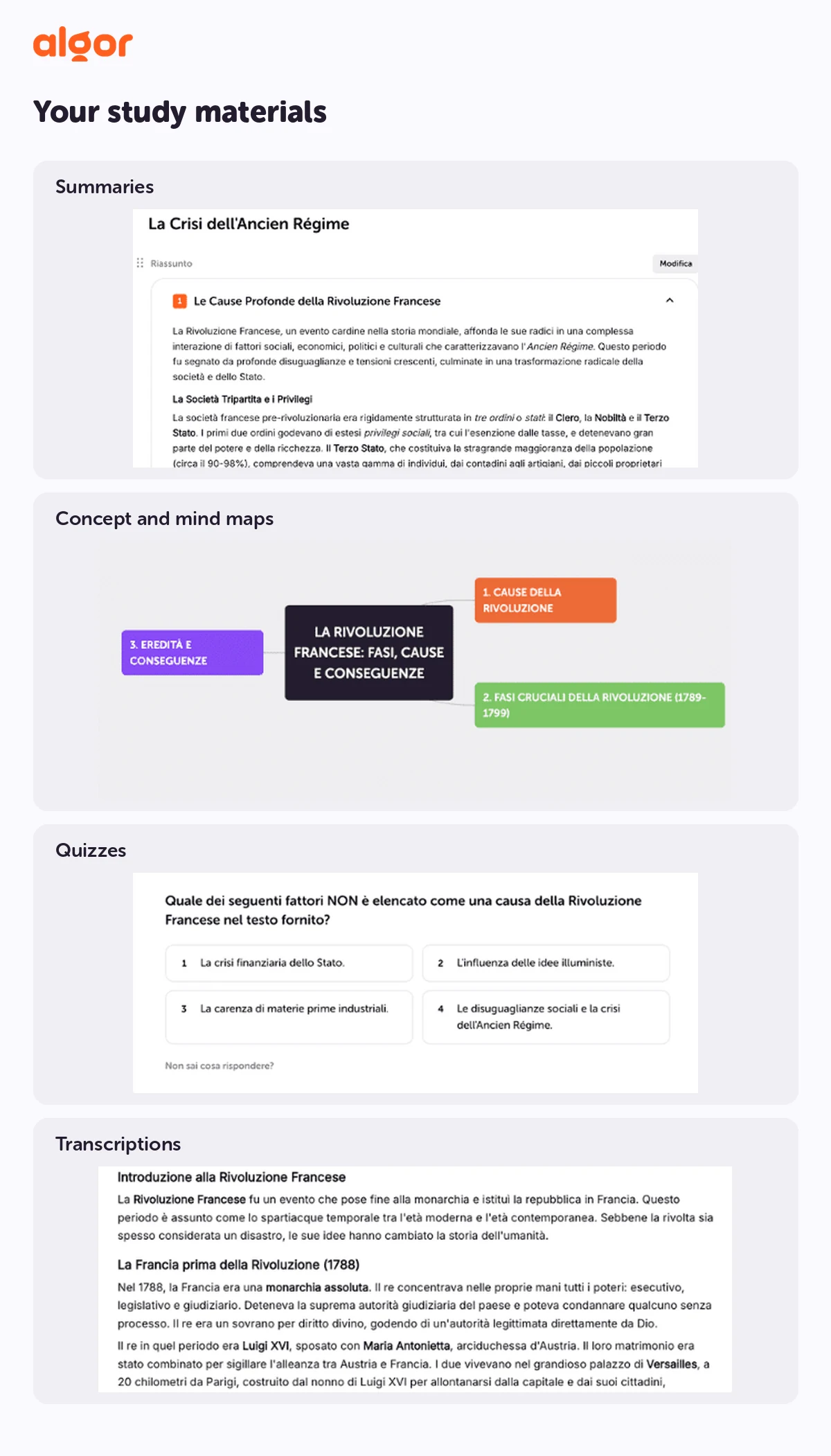
A Set is organised like a book's contents: sections and pages make the subject navigable. Each page contains the topic's text and supporting tools, such as a concept map, summary or podcast-style audio overview.
Flashcards and assessments sit above that page structure. Choose whether to practise the whole Set, a section or a smaller part. This lets you return to a weak chapter without having to regenerate or reorganise the rest of the course.
The tools are based on the same material. The map helps you understand the relationships, the summary helps you revisit the central ideas and the exercises ask you to recall or apply them. You keep the source, explanation and practice connected.
Spaced repetition and progress towards an exam
Algor's flashcards use spaced repetition. After attempting a card and revealing the answer, rate how difficult it was. Cards you struggle with return sooner; those you know well can be scheduled further apart.
This gives you a manageable way to revisit material over time instead of treating every card as equally urgent. Accurate ratings matter: seeing an answer and thinking it looks familiar is different from having recalled it before turning the card.
The progress view adds another layer. Set an exam date and target grade, then use assessment results to see which pages need more work. A planned route can help organise your time, while the material remains visible and editable so that you can decide what deserves extra attention.
The aim is not to let a platform make every study decision for you. It is to give you a clearer basis for those decisions: what you have covered, what you can answer and where you still need practice.
A free way to try the complete workflow
Algor has a free plan that lets you create Sets and try the features with usage limits. Algor’s premium plans start at just a few euros per month with annual billing. They include Sets with a concept map, flashcards, quizzes and all AI features. You get the map editor and the tools to understand, remember and practise the same material in one subscription.
For a useful test, choose one real chapter rather than an abstract topic you already know well. Review the outline, edit the map, practise a few cards and take a quiz. That shows how the parts work together before you commit to using it for a whole course.
Algor's main strengths for students
- Editable AI-generated material: a structured starting point you can check and change.
- A complete map editor: manual and AI editing, layouts, multimedia nodes, translation, listening and print options.
- Connected study tools: text, summaries, maps and audio within the Set, with flashcards and assessments on the material you select.
- Ongoing review: spaced repetition and quiz-informed progress towards an exam goal.
- Accessibility controls: text-to-speech, readability options and adaptable language, without treating any single option as a guaranteed solution for every learner.
- Collaboration: work with other people on the material and continue with your own review.
- A contextual assistant: ask about the Set and inspect the sources behind the answer.
Study together, then review what you need
Invite classmates or students to a Set with the appropriate role. Editors can work on the content together, while Learners can use the study activities without editing the shared source material.
This is helpful when a group is preparing for the same exam but has different weak points. You can maintain one common base, then focus your own flashcard and assessment sessions on what you personally need to revisit.
Comparison table: MindMeister vs Algor
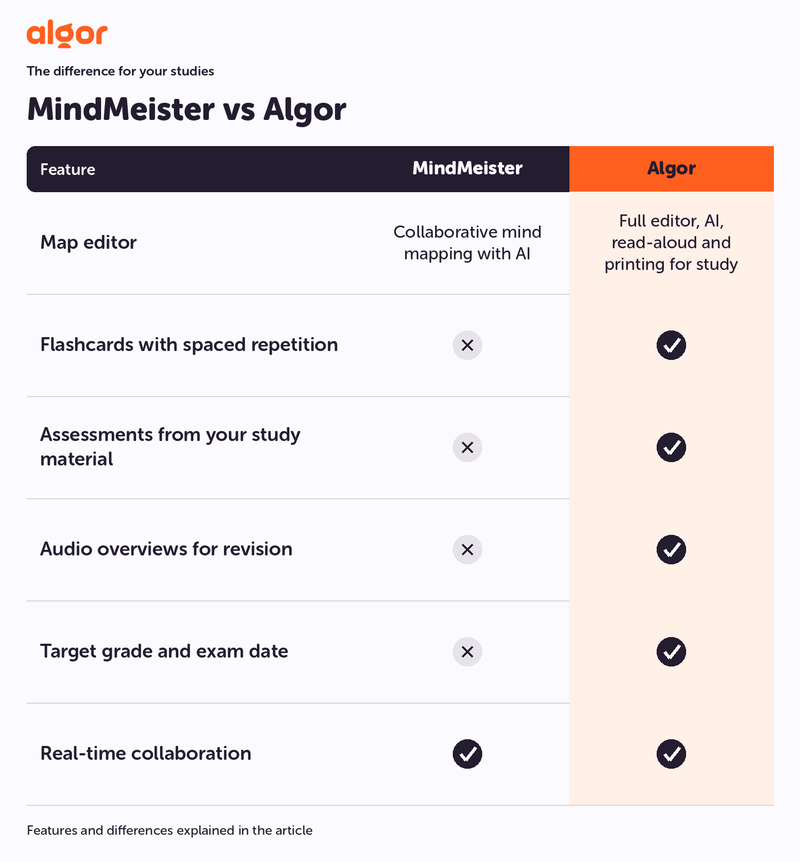
Map editor: MindMeister provides a collaborative mind-map editor with AI. Algor provides a full editor with AI, listening and printing tools within an integrated study environment.
- Flashcards with spaced repetition: included in Algor; not a native MindMeister study workflow.
- Automatically generated assessments on the material: included in Algor; not a native MindMeister study workflow.
- Audio overviews for revision: included in Algor; not a native MindMeister study workflow.
- Target grade and exam date: part of Algor's progress workflow.
- Real-time collaboration: available in both.
The comparison concerns native functions and how they fit together. Usage limits and specific options depend on the plan; a separate tool or integration is not the same as having the study activity inside the Set.
Mind maps or concept maps: what do you need for studying?
Mind maps for exploring and organising ideas
A mind map begins with a central topic and branches out through associations. It can be useful for brainstorming, planning a project, collecting ideas during a discussion or exploring possible essay themes.
MindMeister is built around this kind of visual organisation. It can also help students plan a chapter or organise their notes. But a map's appearance does not remove the need to explain the relationships and practise the content.
If you like a radial layout, you can use one in Algor too. Choosing Algor does not mean giving up the visual format that helps you think.
Concept maps for making relationships explicit
A concept map makes the links between ideas visible: categories, causes, dependencies and other relationships. This can be particularly useful for a complex subject where remembering isolated terms is not enough.
For example, a history chapter may require you to explain how economic and political causes interact. A biology topic may depend on understanding a sequence and what changes at each stage. A map gives you a structure for explaining those connections.
Algor can prepare a first map from the material, but reviewing it is part of the work. Check the links, improve ambiguous labels and add the examples your course requires. Then close the map and practise the explanation yourself.
From brainstorming to a study routine
MindMeister can help organise the chapter. Algor adds the next activities around that organisation: flashcards, assessments and progress within the same Set.
For an exam, choose a workflow that asks you to produce answers as well as look at a structure. Explaining a connection or recalling a definition gives you more useful evidence of preparation than simply recognising the finished map.
When Algor is the better choice
Preparing for a university exam
You have three weeks to prepare for microeconomics. Start from the chapters in Algor, check the outline and refine the maps. Then alternate between understanding the relationships, practising flashcards and taking assessments.
If you keep confusing elasticity with slope, return to those pages, improve the explanation and test yourself again. The advantage is being able to act on a difficulty, not just keep a neat diagram of the course.
Preparing for entrance or professional exams
A large syllabus may contain hundreds of concepts to retain. Organise the material into Sets and use spaced flashcards to return to it over time. Customisable assessments let you select the topics and question formats you want to practise.
Timed practice and feedback options can support preparation, but generated exercises are not a substitute for checking the official exam specification or using authentic practice papers where available.
Studying in another language
You may be working from sources in one language while preparing an exam in another. Algor lets you choose the Set's content language and translate a map, keeping it alongside the rest of your study material.
Check important technical terms against the course's preferred wording. The ability to edit means you can preserve the vocabulary your teacher or examiner expects.
Memorising with flashcards and quizzes
Dates, legal definitions, formulas and vocabulary all benefit from deliberate practice. Algor generates flashcards from the material and supports question-and-answer and fill-in-the-blank formats with spaced repetition.
MindMeister's native focus is the map rather than this scheduled recall workflow. Algor is therefore the stronger fit when remembering and checking the content is as important as organising it.
Adapting how you read and review
If long paragraphs are difficult to work through, you may find maps, listening options and more concise language useful. Algor brings text-to-speech, audio overviews, readability options and adjustable content style into the same Set.
These tools can be part of an individual approach for learners with dyslexia or other study needs. Their usefulness varies by person, so try the controls on your actual material and keep the combination that helps you work clearly.
Our recommendation for studying: Algor
For brainstorming, planning and visual collaboration, MindMeister provides a mapping-focused environment. For a student who needs to understand, retain and test a whole programme, Algor offers the more complete study workflow.
You keep a full map editor and real-time collaboration, while gaining summaries, audio, spaced flashcards, assessments and progress. The assistant knows the Set, and the material remains visible and editable throughout the process.
That continuity is the reason to choose it: the work you put into understanding a chapter continues to support you during review and up to the exam, without needing to assemble several separate study systems.
Try Algor with a chapter you need to learn
Start with Algor's free plan, which includes usage limits. Upload a chapter, check the outline and map, then use the flashcards and assessment to find out what you remember.
The guide to flashcards, assessments and progress and the guide to editing and sharing Sets explain how to use the workflow. You can also explore our NotebookLM alternatives comparison if you are weighing up other ways to work with your sources.
Continue exploring


Faq
Frequently Asked Questions


Get Started with Algor
Transform your content into structured, visual and personalized learning paths.

.svg)


