
ChatGPT vs Algor: Which AI Is Better for Studying?

September 24, 2026
You have a difficult chapter to learn, a folder of lecture notes and an exam approaching. ChatGPT can help explain a passage in seconds. But where do you keep the explanation, connect it to the rest of the course and check that you can still remember it next week?
That is the practical question behind ChatGPT vs Algor. Both use AI, and both can help with studying. The difference is the environment in which you do the work: a general-purpose conversation, or a study Set that brings your source material, editable maps, summaries, audio, flashcards and quizzes together.
This comparison looks at what that means when you are preparing a real exam. Algor's advantage is not simply that it can answer a question. It gives you control over the structure of your material, a full map editor, an assistant that knows the Set and a way to use quiz results to guide your next review.
Which kind of AI do you actually need for studying?
There are plenty of AI tools to choose from: chatbots, image generators, voice assistants and productivity apps. Finding one is easy. Deciding which one should become the main place you study is more useful.
Think about the work you need to do after receiving an explanation. Where will you build a map of the chapter? How will you organise the course content? How will you practise the parts you keep forgetting and see whether your preparation is improving?
Those are the tasks where Algor offers a concrete advantage. You can move from understanding to editing, practising and checking the same material without rebuilding the workflow for every topic.
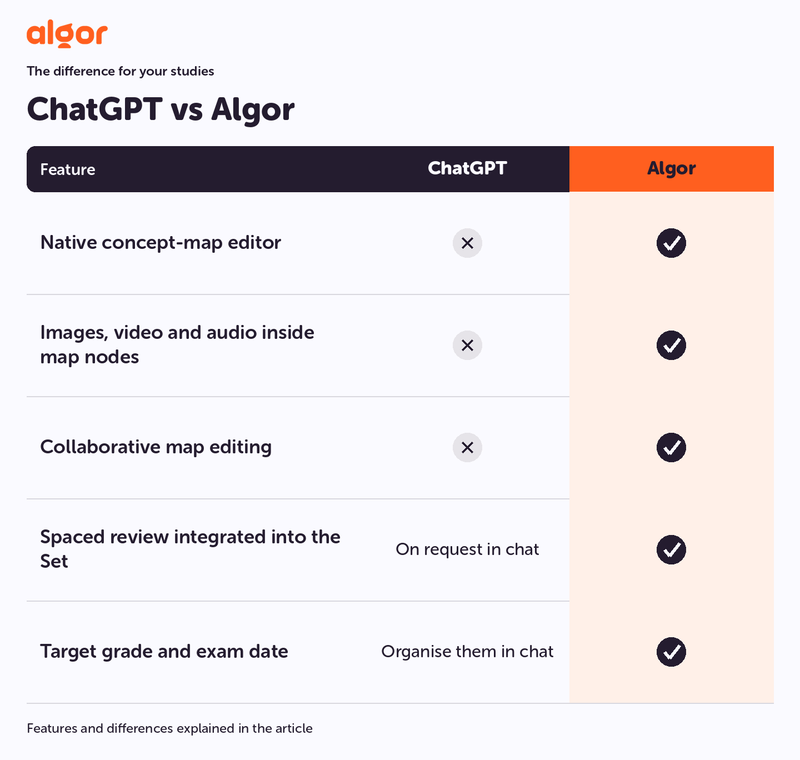
Key differences in the native study workflow:
- Dedicated concept-map editor: ChatGPT can help generate diagrams, but a native node-by-node concept-map editor is not its standard study interface. Algor includes one.
- Images, video and audio inside map nodes: these are part of Algor's map editor, rather than a separate diagram-building task.
- Collaborative map editing: Algor supports real-time work on the map with other people.
- Spaced review integrated into the Set: you can prompt ChatGPT to create questions or flashcard content; Algor provides a dedicated spaced-repetition workflow connected to your study material, alongside quizzes and progress tracking.
- Exam date and target grade: in Algor, these belong to the progress workflow. In a chat, you need to organise that planning through the conversation and available tools.
Both products evolve, and usage limits depend on the plan. The comparison concerns how these activities fit into the product, not whether a creative prompt or a separate integration could reproduce part of them.
What is ChatGPT, and how can it help you study?
A general-purpose conversational assistant
ChatGPT is OpenAI's conversational AI assistant. You can ask about subjects ranging from philosophy and chemistry to history and programming, request a different explanation or work through a problem in a dialogue.
You can ask ChatGPT to generate practice questions, quizzes or flashcard content. Algor connects that practice to a complete study Set: editable maps, organised explanations, scheduled flashcard review and assessments that feed your progress. You work on one coherent body of material instead of building each activity through a separate request.
When it is useful for a student
A conversation can be helpful when you need a specific idea explained differently, want examples or need questions to test a passage. The ability to ask follow-up questions makes that process flexible.
For an entire course, however, you also need somewhere to keep and revise what you are learning. In Algor, the explanation sits alongside an editable map and the rest of the chapter. You can add your own example and later practise the same content through a quiz or flashcard session.
What to consider for daily study
Before choosing your main study environment, consider these practical needs:
- Editable maps: a diagram generated in a conversation is not the same as moving nodes, changing links and switching layouts in a dedicated editor.
- Checkable content: important statements need to be compared with the source. Algor lets you review the proposed outline before generating the pages.
- Review over time: Algor's flashcards have a spaced-repetition schedule informed by your difficulty ratings.
- Preparation by topic: assessments feed into progress on the material, so you can decide which part of the course to revisit.
- Multimedia explanations: add an image, audio or video directly to a map node when it helps clarify the concept.
- Shared study: edit maps with classmates in real time, then continue your own review.
What is Algor Education, and how is it different?
AI organised around studying
Algor Education is a study platform available on the web and through iOS and Android apps. It includes an AI assistant, but the main workflow goes beyond an exchange of messages: your material becomes a structured, editable Set.
ChatGPT can also work with uploaded files. Algor's distinction is what you can do with the resulting study guide. Review its outline, rewrite text, add or move pages and reorganise sections. You can follow the teacher's syllabus and change the order of study when you need to.
This control matters when an exam is important. A suggested structure can save time, but you still need to inspect the content, check that the programme is covered and give more attention to the areas where you struggle.
Maps, summaries, flashcards, quizzes and transcriptions
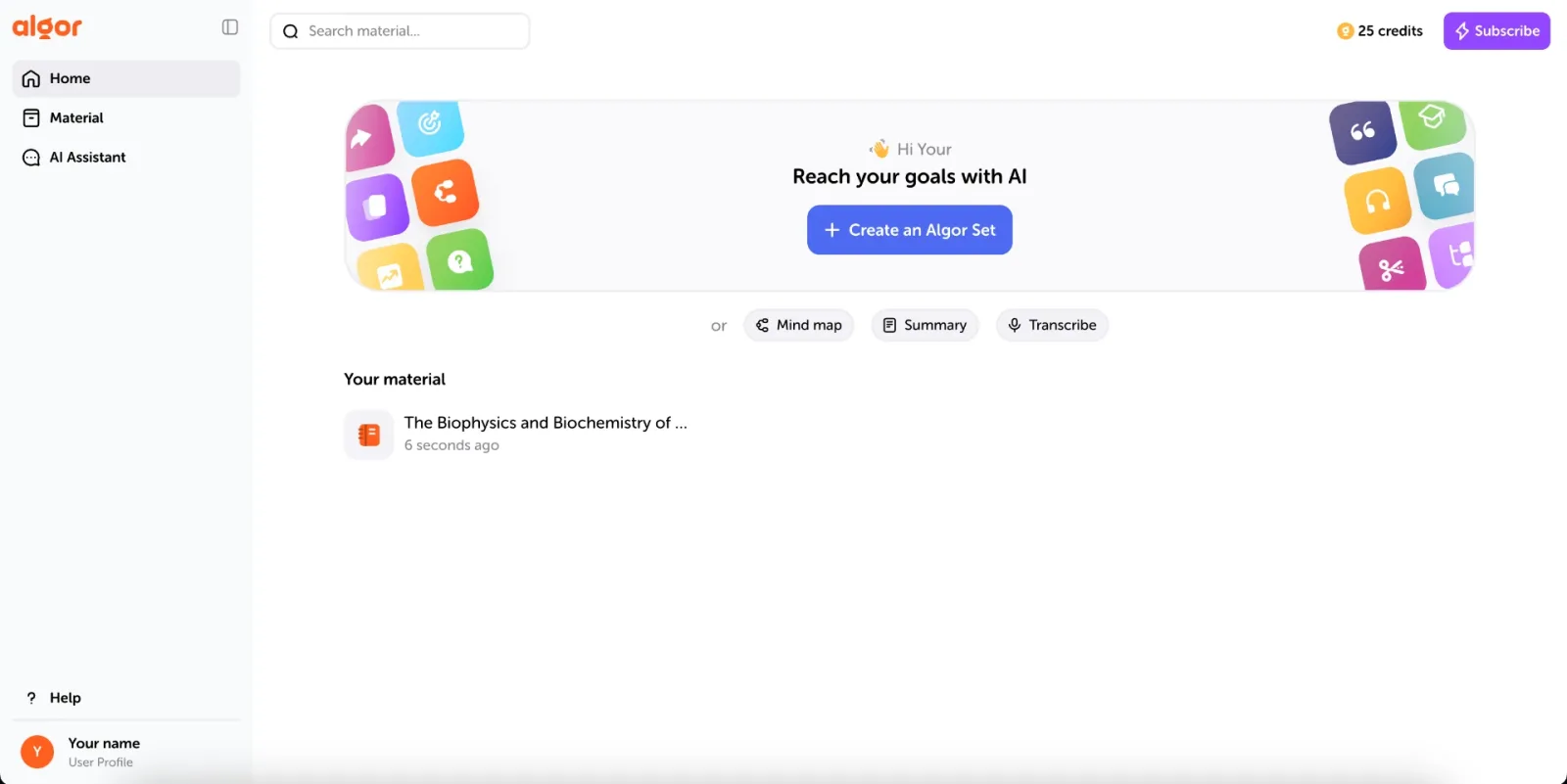
From Home, choose Create an Algor Set and select your source: a PDF, Word document, photo of handwritten notes, pasted text, web or YouTube link, or simply a topic. Specify the audience, style and language, review the outline and generate the content. For recorded audio or video lessons, start with transcription.
The study workflow includes:
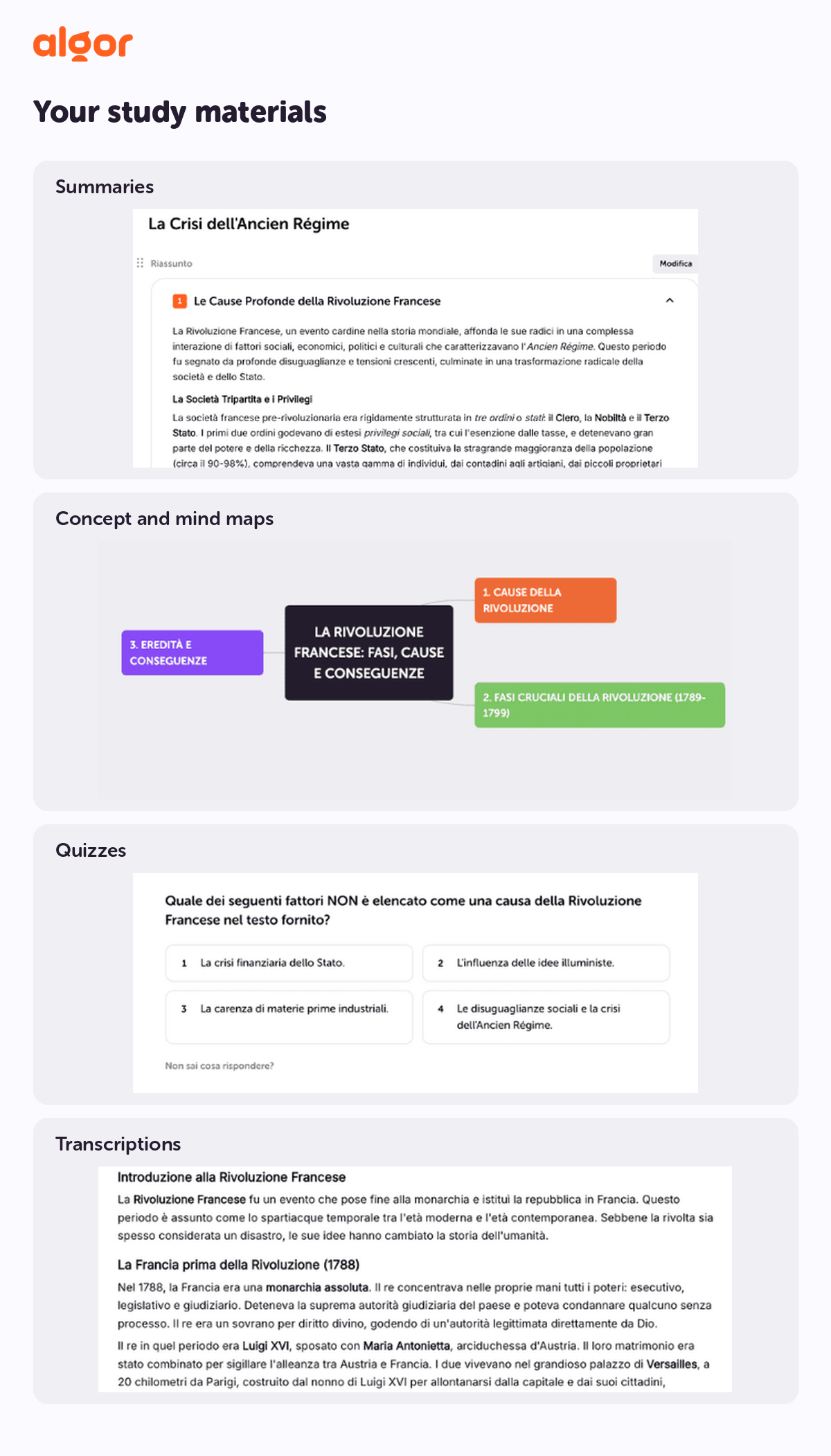
- Concept maps: editable visual structures showing the relationships between ideas.
- Mind-map layouts: organise a central topic radially and adjust it node by node.
- Summaries: bring the important points together alongside the page text.
- Flashcards: practise questions or fill-in-the-blank cards with spaced repetition.
- Quizzes and assessments: choose question types and the part of the Set you want to practise.
- Transcriptions: turn recorded explanations into text you can use for studying.
Generation does not lock the result. In the map editor, move or rewrite nodes, change connections and personalise layouts, colours and fonts. Add multimedia or ask the AI to expand or shorten a branch. Real-time collaboration, text-to-speech and print options make the map something you can actively work with, listen to and take onto paper.
Readability options and adaptable language can also help you shape the material around your needs. These are practical controls within the study workflow, not a promise that one presentation style will suit every learner.
More control over PDFs, books and notes
When you create a Set from your documents, the material provides the basis for the study guide. Before generating a long chapter, review the proposed sections and pages. If an important topic is missing or the order does not match your course, change the outline first.
You can then check the generated pages against the original source and make corrections. The Set's assistant uses the context of your material and provides citations you can open to inspect the source.
You can try Algor with the free plan and its usage limits. Algor’s premium plans start at just a few euros per month with annual billing. They include Sets with a concept map, flashcards, quizzes and all AI features. The workflow stays under your control: inspect the structure, edit the pages and return to the saved material for review.
Your Sets stay in your materials, which you can organise into folders. A chapter is therefore something you can develop and revisit over several weeks, not just an answer you read once.
ChatGPT vs Algor: the practical difference
ChatGPT: flexible conversation and activities on request
ChatGPT can provide explanations, study conversations and practice activities. It is useful when you know what you want to ask and want to explore the answer through follow-up questions.
Algor adds a dedicated environment for working through a course. If understanding a chapter requires connecting ideas, annotating a map or adding a figure to a node, you can do that directly in the editor. You do not need to design a custom diagram workflow through prompts or code.
Algor: study material you can work with
Algor turns AI-generated content into tools for active study: maps you can change, flashcards you can review, quizzes you can complete and audio you can listen to.
These tools remain connected to the Set. After an uncertain quiz answer, you can return to the relevant page, improve your explanation and practise again. The aim is to support that full cycle, not only the first explanation.
An outline you can check before generation
One useful distinction appears before you begin reading the generated pages. Algor shows you the proposed structure, giving you a chance to check it against the syllabus.
Then you retain control of the content itself. Add a teacher's example, correct a connection in a map or move a page into the section where it belongs. You can follow the recommended order or spend extra time on a weak topic without losing access to the rest of your material.
Which tool should you choose for a chapter or a whole book?
A long chapter needs more than a shorter version of its paragraphs. You need a structure that shows what belongs together, where the key ideas connect and which parts you still need to study.
In Algor, that work begins with the outline. The platform helps identify the main concepts and prepare the pages; you review and refine the result. You can then use the map to see the relationships and the summary to revisit the central points.
- Check the proposed sections before generating.
- Adjust the structure to match your course.
- Edit the map and add examples from the source.
- Practise the same material through flashcards and assessments.
- Return to the pages that your results show need more attention.
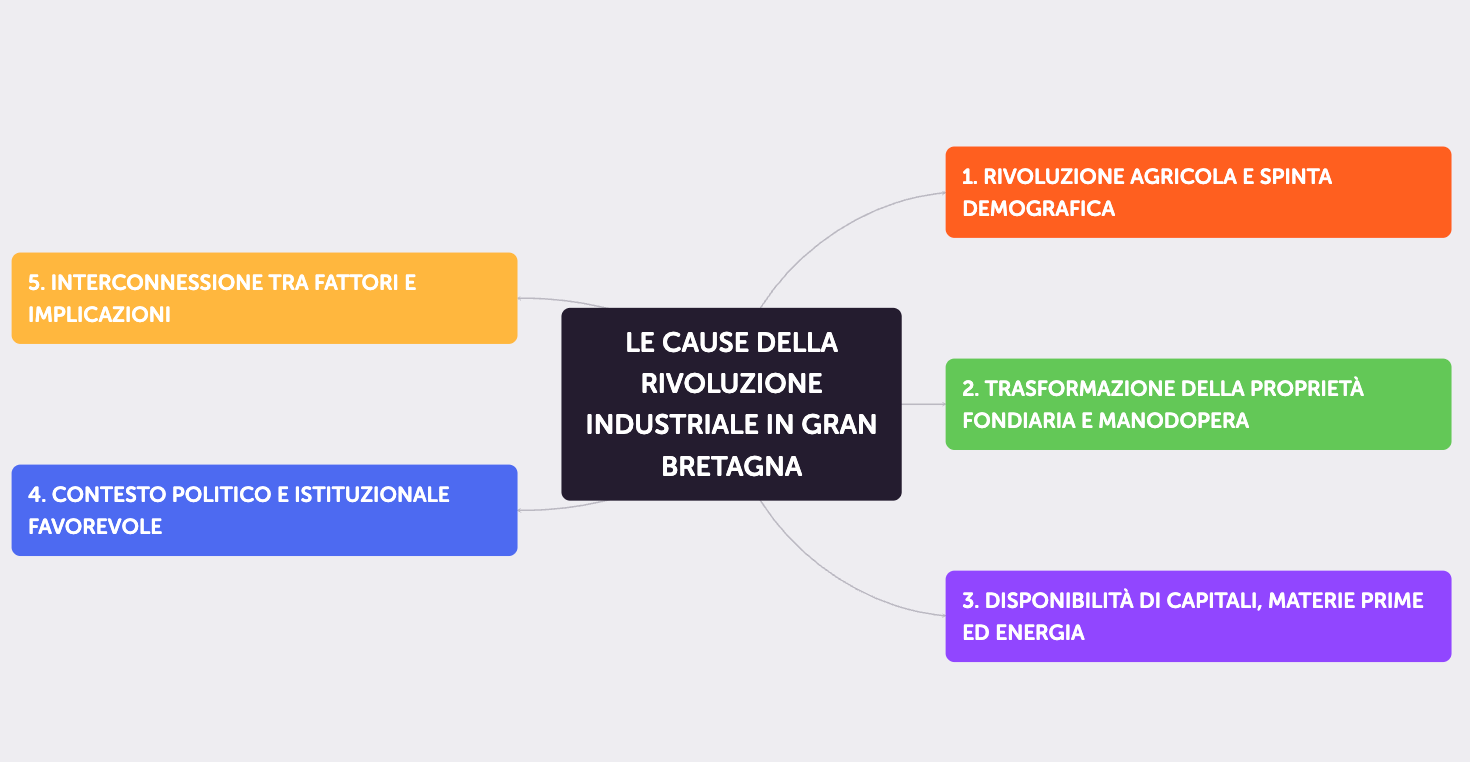
For long, technical or complex texts, this ability to inspect and change the material is a strong reason to choose Algor. You keep the visual organisation and the review workflow in one place.
Which tool should you choose for exam revision?
For a quick question, a conversation can be enough. ChatGPT can explain a difficult point, and Algor's assistant can also help while you are working inside a Set. You can ask about the material without leaving the study environment.
For organised revision, Algor gives you a clearer cycle: choose the pages, take an assessment, examine the results and revisit the weak areas. Quiz results feed the progress view, helping you distinguish a topic you have merely read from one you can answer questions about.
Spaced flashcards then support review across sessions. You do not have to remember which definition felt difficult three days ago; the review schedule uses your ratings to bring cards back.
This puts active recall into the workflow. Research on retrieval practice, including Roediger and Karpicke's work on the testing effect, supports the value of practising recall rather than relying on rereading alone. The tool still needs to be used thoughtfully: answer before checking and correct mistakes against the source.
What if you study from recorded lessons?
A recording preserves an explanation, but listening back to the entire file is not always an efficient way to revise it. The useful next step is turning it into material you can navigate and practise.
ChatGPT also has voice and recording-related features, depending on the app and plan. Algor's transcription workflow is directed towards study: upload the audio or video, obtain text, then use it as the basis for a Set and its tools.
Transcription supports Italian, English, Spanish, French and German. From the resulting material, you can build maps and summaries and practise with flashcards and quizzes. Check the transcript where names, terminology or audio quality make accuracy especially important.
The Algor guide to creating content explains the transcription and Set workflows. It is a practical route from keeping a lesson to actually studying it.
Which AI is more reliable for studying?
Important information still needs checking
AI tools can make mistakes, even when you provide the source material. A confident explanation is not enough evidence that a statement is correct.
For exam preparation, editable material and accessible sources matter. If a definition is imprecise or a diagram misses a relationship, you need to be able to inspect the original and correct the study resource before you practise it repeatedly.
Algor's assistant knows the Set and cites sources
Algor's Set assistant works with the context of your material, including the study content and maps. Ask it to clarify a connection, compare ideas from different pages or help you return to an earlier topic.
You do not have to rebuild the context from scratch each time. Citations help you inspect where an answer came from, and the source link can take you back to the relevant page. That makes checking part of the same workflow as asking.
The benefit is not a guarantee of error-free AI. It is an environment in which your sources, explanations and corrections remain connected and under your control.
For a complete exam workflow, choose Algor
If you need a flexible conversation about a question, ChatGPT can be useful. If you need to understand, connect, memorise and check an entire programme, Algor is the stronger fit for the main study environment.
You get a full map editor alongside text, audio, flashcards, quizzes and an assistant that knows the Set. You can collaborate on the material, adapt it to the syllabus, print maps for offline study and decide where to focus next using your results.
That continuity works across subjects: history and literature, law and science, or any course where you need to organise and practise substantial material. Algor does not ask you to surrender control to an automatic path. It helps you build a path you can inspect and change.
Try Algor's free plan, with its usage limits, on a chapter you actually need to study. Use the guide to flashcards, assessments and progress to move beyond generating the material and start testing what you know.
Continue exploring


Faq
Frequently Asked Questions

Get Started with Algor
Transform your content into structured, visual and personalized learning paths.

.svg)


