
Concept Map Maker

Cecilia Ganapini
December 24, 2022

Making concept maps online
Have you ever heard of apps for creating concept maps online? If you're a teacher, a student, or simply looking to reorganize your ideas or delve deeper into a study topic, concept maps can be of great help.
In this article, we'll briefly explore what concept maps are, why they are useful for learning, the advantages of creating them online as opposed to drawing them with paper and pen, and how to create them with AI-powered web apps like Algor Education.
What is a concept map
Concept maps are excellent graphic tools with significant visual impact, enabling the logical and hierarchical representation of information. They consist of two main elements:
- Keywords or phrases, representing the main concepts, placed inside boxes or nodes of different shapes.
- Arrows that connect the key concepts, indicating the hierarchical or logical relationships between concepts.
Why are concept maps useful
Concept maps are highly beneficial for studying as they allow visualization and understanding of the relationships between concepts, aiding in better memorization, comprehension and processing of the material. They are particularly useful for summarizing and synthesizing complex information, such as study or research topics. In short, here's why you should consider creating concept maps as a study method:
- They help visualize information based on your verbal or visual strategy.
- They enable a better understanding of the starting text.
- They elucidate hierarchical relationships and connections between different main concepts.
- They facilitate the formulation of concepts and aid in retention.
- They allow for the retrieval of information for oral presentation.
Creating concept maps online: the advantages
Pen and paper or digital? Everyone has their preferred method, but it's undeniable that creating concept maps online with a web app or software offers several advantages:
- Easy editing, making corrections and changes is much faster and more effective on a digital sheet.
- Personalization of your maps with the addition of images, videos, audio, and web resources, making the study even more interactive.
- Easy access to your work, from any place and device.
- Collaboration with other users in real time, easily sharing and editing with friends and teachers.
Additionally, creating concept maps online with advanced web apps like Algor Education allows you to take advantage of features such as automatic map creation from a topic or a long text, or automatic reading with speech synthesis. AI-powered text to map helps to save a lot of time
How to create concept maps in 5 steps
Where do you start to create an effective concept map? Let's see how to create concept maps in 5 simple steps:
- Choose a topic for your concept map.
- Identify the key concepts related to the topic.
- Organize concepts into a logical structure.
- Add relationships between concepts using arrows and lines.
- Customize your concept map with images, colors, and other visual elements.
If you want to learn more about this topic, read our detailed guide on how to make concept maps. Given the usefulness of concept maps and the advantages offered by digital technology, which application should you choose to create concept maps online? We recommend Algor Education.
The best concept mapping tool: Algor Education
If you are looking for an app to create concept maps online in a simple and effective way, Algor Education is definitely the right choice for you. This modern web application is accessible from any device through a browser (for example, Google Chrome) and allows you to create concept maps in different ways: starting from an empty sheet, from a ready-made template, from a digital document, or starting from any text automatically. The main features of Algor Education are:
- Create concept maps from scratch, starting from a ready-made map or a document.
- Create concept maps and summaries automatically from a topic, starting from photos of your books or from a Pdf with AI functions.
- Personalize maps with different layouts and insert images, videos, audio, and web resources.
- Share maps with other users and make changes in real time.
- Listen to the text of the maps or documents with speech synthesis with karaoke highlighting.
- Print and export the maps as an image or in PDF format.

How to create concept maps with Algor Education
The first step to start creating online concept maps with Algor Education is to register for free at app.algoreducation.com. By creating a free personal account, you have access to the Free Plan, which allows you to start creating and sharing free online concept maps made of text nodes. You have several options for making maps with Algor:
- Start with an empty concept map template to fill in or use our ready-made concept maps;
- Create concept maps from your digital books. On our platform, your PDF or Word documents communicate with the concept map editor on the same screen. In a few clicks you can create map nodes directly from your digital books;
- Use our innovative AI features to create maps quickly by getting suggestions from our algorithms. Create concept maps automatically from digital texts, photos of paper books, or any topic via a keyword.
Customise your concept maps online
Algor Education is definitely the easiest-to-use app for making concept maps with automatic functions from text, making the creation of concept maps online much easier and more interactive. Another advantage of Algor Education is the ability to create maps from documents, such as digital books or note files: In a few clicks, it's easy to go from document to map.
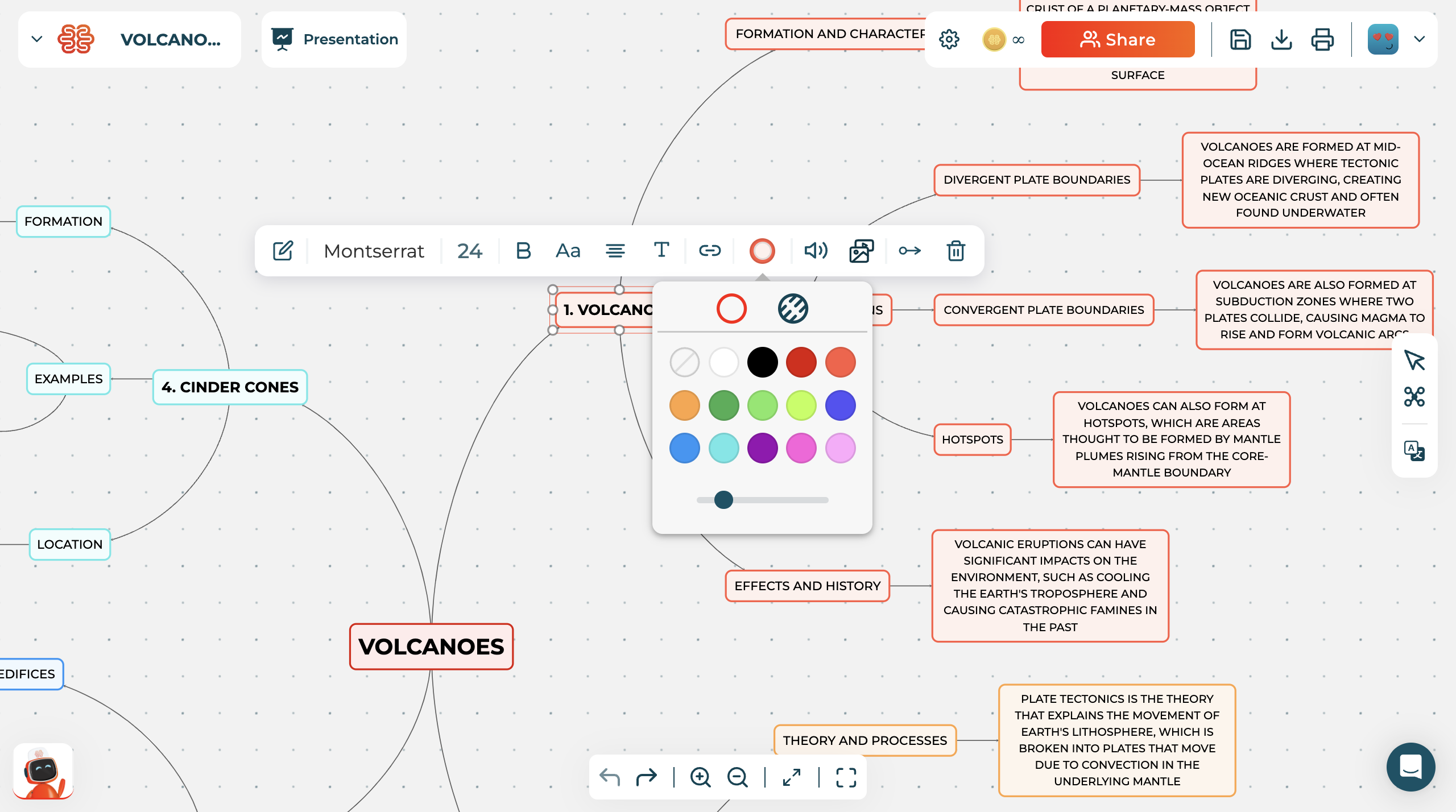
In Algor Education you can unleash your creativity in the multimedia editor by editing and customising your maps however you like. Here's a summary of what you can do:
- Modify styles and formatting, change fonts and text sizes, customise concept map node border colours;
- Choose between concept map and mind map layouts;
- Insert images into your concept maps, either by uploading them from your device or by searching for them directly on the web;
- Embed YouTube videos into your concept map nodes or watch automatically suggested ones;
- Record voice audio from your device, insert it into your map nodes and listen to it whenever you want;
- Insert links and hyperlinks to any web page.
Personalisation of online maps makes study more interactive, stimulating and effective, especially for visual learners.
Collaborate in real time and share with other users
Algor Education is very useful when you want to brainstorm and collaborate with other users on the same map. Thanks to real-time collaboration, you can share material with friends and colleagues and edit it in real time.
Everyone can make their own contribution, or make changes later that will be seen by all collaborators. You can share your concept maps online with a simple link and manage sharing permissions: owner, publisher and viewer.
To print your concept maps created online with Algor Education, you can export them in PDF and PNG format and download them to your device. Each map will have its own QR code that you can scan to access it from any device.
Creating concept maps online with inclusive tools
Algor Education is the most inclusive web application for creating online concept maps, tailored to those learners with neurodiversitites. Students of all ages can find the right tools to learn effectively:
- Text-to-speech with highlighting, available in different voices, languages and playback speed. Very useful to make reading long texts less burdensome;
- Dyslexic-friendly fonts, optimised for reading by dyslexic learners, e.g. LexieReadable or OpenDyslexic.
- The inclusive interface bringing together folders and material is designed to be simple and intuitive, also thanks to the visual impact of symbols and colours.
Try Algor Education for free
In conclusion, concept maps are a valuable tool for study and learning. Creating concept maps online has several advantages compared to the paper version, such as the ability to easily rework, customize, and work collaboratively. Algor Education is an easy-to-use app with advanced features that make creating concept maps online even easier and more interactive.

Algor Education offers a Free Plan, always free, that allows you to create a limited number of maps. Then there are several paid plans to take advantage of unlimited maps, AI automatic functions, printing, speech synthesis, etc. Try it now for free by registering on app.algoreducation.com.


Faq
Frequently Asked Questions

Related articles

Jetzt mit Algor starten
Verwandle deine Inhalte in strukturierte, visuelle und persönliche Lernwege.

.svg)


